

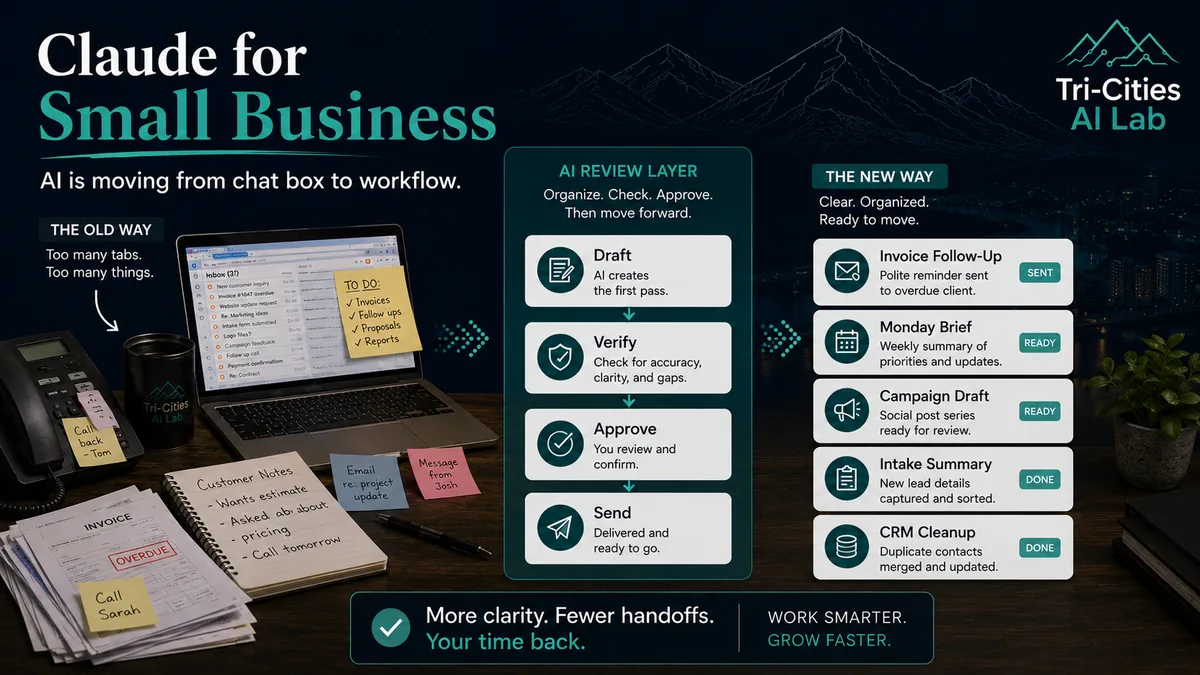
Artificial intelligence for small business is moving out of the blank chat box phase.
That is the real story behind Anthropic’s new Claude for Small Business.
The announcement is not just another AI company saying small businesses should “use AI.” It is a sign that major AI platforms are starting to package AI around the actual work small businesses deal with every week: payroll planning, month-end close, invoice follow-up, customer notes, marketing campaigns, contracts, sales pipeline updates, and internal reporting.
For local businesses in Kingsport, Johnson City, Bristol, East Tennessee, and Southwest Virginia, that matters.
Most small business owners do not need another shiny tool. They need fewer things slipping through the cracks. They need better follow-up. They need cleaner notes. They need help turning scattered information into usable decisions. And they need all of that without handing the keys to the business over to software they do not understand.
That is why this launch is worth paying attention to.
What Anthropic actually announced
Anthropic launched Claude for Small Business on May 13, 2026. In its announcement, Anthropic described it as “a package of connectors and ready-to-run workflows” that puts Claude inside tools small business owners already use.
That distinction is important.
This is not simply “open Claude and ask it a question.” This is Anthropic trying to move Claude closer to the actual systems where small business work already happens.
According to Anthropic, Claude for Small Business connects with business tools including:
- Intuit QuickBooks
- PayPal
- HubSpot
- Canva
- DocuSign
- Google Workspace
- Microsoft 365
Claude’s small business solution page and plugin materials also reference additional workflow connections such as Slack, Gmail/Outlook, Stripe, Square, and Google Drive, depending on the workflow and setup.
The product runs through Claude Cowork, Anthropic’s desktop-based environment for agent-like work. Anthropic’s release notes say Claude Cowork became generally available on macOS and Windows through the Claude Desktop app in April 2026.
Anthropic says Claude for Small Business includes 15 ready-to-run workflows across finance, operations, sales, marketing, HR, and customer service, along with 15 reusable skills built around repeatable small business tasks.
In plain English: Claude is being packaged less like a chatbot and more like a reviewed workflow assistant.
Source: Anthropic: Introducing Claude for Small Business
The key idea: AI does the prep work, the owner keeps control
The most important part of the announcement is not the number of workflows. It is the approval model.
Anthropic says the user approves before anything sends, posts, or pays.
That matters because there is a big difference between:
- AI drafting a follow-up email and AI sending it without review.
- AI flagging overdue invoices and AI contacting customers on its own.
- AI preparing a campaign and AI publishing under your business name without approval.
- AI summarizing a contract and AI making a legal or financial decision for you.
That line is where small businesses should pay close attention.
At Tri-Cities AI Lab, this is the same principle we keep coming back to:
AI drafts. You verify. You sign your name.
The useful version of AI for small business is not “let the robot run the company.” The useful version is structured assistance with human review built in.
That is how small businesses avoid AI slop.
What the outside reporting adds
Axios framed Claude for Small Business as part of a larger race by AI companies to reach small businesses, solo operators, and lean teams. That is a useful way to understand the announcement.
For the last few years, a lot of AI attention has gone to enterprise companies, developers, and individual consumers. Small businesses have often been stuck in the middle. They are big enough to have real operational problems, but not always big enough to have IT departments, automation teams, or time to experiment with every new tool.
Axios also highlighted the practical challenge: small businesses are price-sensitive, short on time, and often skeptical about connecting sensitive business data to AI systems.
That is not a small obstacle. It is the whole issue.
Most local owners are not sitting around wondering which AI model has the best benchmark score. They are wondering:
- Will this save me time?
- Will it make my staff’s job easier?
- Will it create more work to manage?
- Will it expose customer or financial data?
- Will it make my business sound generic?
- Will I still be in control?
Those are the right questions.
Source: Axios: Anthropic wants small businesses to use Claude
Why this matters now
Small businesses are already using AI, but many are not using it in a structured way.
Goldman Sachs surveyed small business owners in early 2026 and found that 76% reported currently using AI. Among those using AI, 93% said it had a positive impact, and 84% cited increased efficiency and productivity as the primary benefit.
But the same survey found something more important: only 14% said AI was fully integrated into their core operations.
That gap explains a lot.
Many owners have tried ChatGPT, Claude, Gemini, Microsoft Copilot, or another AI tool. They may have used it to write a social post, summarize a document, clean up an email, or generate blog ideas.
That is useful, but it is still first-step AI.
The bigger value comes when AI is tied to a real workflow:
- A front desk call becomes a clean intake summary.
- A customer email becomes a reviewed follow-up draft.
- A month of transactions becomes a plain-English business brief.
- A messy sales pipeline becomes a prioritized follow-up list.
- A slow season becomes a campaign plan based on actual business context.
The U.S. Chamber of Commerce reported a similar trend. Its 2025 small business technology report found that 58% of small businesses said they use generative AI, up from 40% in 2024 and 23% in 2023.
So the question is no longer whether small businesses will use AI.
The better question is whether they will use it safely, clearly, and in ways that actually help the business.
Figuring out the safe, clear way to use it for your specific business is what an AI Strategy conversation is for. Tell us what is slowing you down.
Sources: Goldman Sachs: AI Presents a Major Opportunity for Small Businesses; U.S. Chamber of Commerce: Small Business AI Adoption
The complete picture: this is not about replacing people
One reason local businesses are skeptical of AI is that the conversation is often framed badly.
Too much AI marketing sounds like this:
“Replace your staff. Automate everything. Let AI handle it.”
That is not the message most small businesses need.
A better message is:
Use AI to reduce repetitive work, organize messy information, and prepare better drafts for human review.
Goldman Sachs found that 87% of surveyed small businesses using AI said it augments rather than replaces employees.
That matches the most practical local use cases.
AI is not a replacement for your front desk, your bookkeeper, your office manager, your salesperson, your attorney, your accountant, or your judgment.
But it can help those people breathe.
It can help them move faster. It can help them avoid missing follow-ups. It can help them turn scattered notes into usable information. It can help them start from a cleaner draft instead of a blank page.
That is where AI becomes useful.
What Claude for Small Business is really trying to solve
The problem with a blank AI chat box is that the user has to do too much work.
You have to explain your business. You have to paste context. You have to describe the workflow. You have to remember the rules. You have to move the output somewhere else. You have to check whether it made things up. You have to start over the next time.
Claude for Small Business points toward a different model:
- Connect the tools.
- Choose the workflow.
- Let AI prepare the work.
- Review the plan and the output.
- Approve before anything goes to customers, money, or public channels.
That is the larger shift.
AI is moving from “something you chat with” to “something that helps run a defined process.”
For small businesses, that process layer matters more than the buzzwords.
Practical use cases for local businesses
The best first AI workflows are usually not flashy. They are the repetitive, annoying, easy-to-review tasks that quietly eat time every week.
1. Front desk and intake support
This is one of the clearest use cases for local offices, clinics, contractors, nonprofits, and law firms.
AI can help turn rough notes into structured summaries. It can draft follow-up messages. It can organize intake information into categories. It can create action-item lists from call notes or email threads.
That does not replace the front desk. It gives the front desk breathing room.
Useful examples include:
- Call summaries
- Follow-up drafts
- Intake notes
- Appointment preparation
- Internal handoff notes
- Action-item lists for staff review
2. Invoice follow-up and cash-flow visibility
Anthropic’s own examples include payroll planning, overdue invoices, PayPal settlements, and QuickBooks cash positions.
For small businesses, this is a strong use case because cash flow is not abstract. It affects payroll, vendor payments, owner stress, hiring decisions, and whether a slow month becomes a serious problem.
An AI-supported workflow could help:
- Identify overdue invoices
- Rank receivables by urgency
- Draft polite reminder emails
- Summarize expected cash position
- Prepare questions for the bookkeeper or accountant
The key is review. AI should not be firing off payment reminders or making financial decisions on its own. But it can absolutely prepare the work so a human can act faster.
3. Month-end close and plain-English reporting
Most small business owners do not want to live inside spreadsheets. They want to know what happened, what changed, what needs attention, and what questions they should ask their accountant.
Claude for Small Business includes workflows around month-end close and plain-English profit-and-loss narratives. That is useful because many small businesses already have data sitting in QuickBooks, PayPal, Stripe, spreadsheets, email, and bank accounts, but they do not always have a clean story from that data.
A practical AI workflow could help produce:
- A monthly business summary
- Revenue trend notes
- Expense anomaly flags
- Questions for the accountant
- Unmatched transaction flags
- A simple owner-facing financial brief
This does not replace the accountant. It gives the owner and accountant a better starting point.
4. Marketing campaigns that do not sound generic
This is where many businesses get into trouble with AI. They ask for a social media post, get something generic, and publish it. That is how you get AI slop.
The better approach is to connect marketing work to business context. Anthropic’s examples include identifying a weak revenue period, planning a promotion, creating Canva assets, segmenting a HubSpot list, and staging the campaign for review.
That is closer to how marketing should work.
Instead of asking:
“Write me a Facebook post.”
A stronger workflow asks:
“Look at the business context, identify the slow period, draft a campaign, prepare the assets, and let me review everything before it goes out.”
That is a major difference.
5. Lead triage and CRM cleanup
For contractors, home service companies, real estate teams, professional services firms, and nonprofits, leads often come from everywhere: website forms, calls, referrals, emails, Facebook messages, events, and old spreadsheets.
AI can help organize that mess.
A reviewed workflow could help:
- Summarize new leads
- Group leads by urgency
- Draft follow-up emails
- Spot stale opportunities
- Prepare a weekly pipeline report
- Clean up CRM notes
Again, this is not magic. It is not a replacement for sales judgment. But it can keep good opportunities from dying in the inbox.
6. Contract and document review support
Claude’s small business plugin materials reference contract review as one of the workflow areas.
For small businesses, this can be useful for first-pass review of vendor agreements, service contracts, leases, proposals, and policy documents.
But the boundary needs to be clear.
AI can summarize. AI can flag unusual clauses. AI can create a list of questions. AI can compare a document against your internal preferences.
AI should not be treated as a lawyer, accountant, insurance agent, compliance officer, or final decision-maker.
The safer framing is:
Use AI to prepare better questions for the professional, not to replace the professional.
The hidden issue: setup matters more than the tool
This is where a lot of AI coverage misses the point.
Small businesses are not usually short on software. They are short on time, documentation, clean processes, and clear rules for who approves what.
Goldman Sachs found that small businesses still face barriers around data privacy and security, lack of technical expertise, and difficulty choosing the right tools. The same survey found that 73% said they would benefit from more training and resources to implement and evaluate AI.
That matches what we see locally.
The problem is rarely, “Can this AI tool do something?”
The better questions are:
- What should AI be allowed to access?
- What should it never touch?
- Who reviews the output?
- Where does the final decision happen?
- What information is too sensitive to upload?
- What workflow is worth improving first?
- What does success look like after 30 days?
Without those answers, a business can spend money on AI and still end up with more confusion.
The trust question is not optional
Anthropic says Claude for Small Business is built for trust and that owners approve key actions. Axios also reported that existing account permissions carry over, meaning Claude should only be able to access what the connected account is already allowed to access.
That is the right direction, but businesses still need to be careful.
Before connecting AI to business tools, owners should think through:
- Who has access to the AI account?
- Which apps are connected?
- What data can the AI read?
- Can it only draft, or can it take action?
- Are approvals required before sending, posting, or paying?
- Is the business using an individual plan or a business/team plan?
- Are employees trained on what not to upload?
This is especially important for businesses that handle customer records, financial data, legal documents, employee files, medical information, or sensitive internal communications.
Regulated or highly sensitive workflows need a separate review before any AI tool is connected.
AI is useful, but it needs guardrails.
What this means for Tri-Cities businesses
For many local businesses, the best first AI project is not a massive transformation. It is one narrow workflow that is painful, repetitive, and easy to review.
Here are a few examples:
- Law firms: organize intake notes, summarize documents, prepare follow-up drafts, and create internal case task lists for attorney review.
- Contractors: turn rough field notes into estimate drafts, customer updates, job summaries, and follow-up reminders.
- Retailers: review sales trends, plan seasonal promotions, and draft campaign materials for human approval.
- Restaurants: summarize reviews, organize catering inquiries, draft event follow-ups, and identify slow periods for promotions.
- Accounting and bookkeeping offices: organize client documents, prepare question lists, summarize monthly activity, and improve internal handoffs.
- Nonprofits: turn board notes, donor updates, grant information, and event planning details into cleaner internal summaries.
That is where AI becomes real.
Not because it sounds futuristic. Not because it replaces people. But because it takes work that is already happening and makes it easier to manage.
What businesses should not do
Claude for Small Business is promising, but it does not remove the need for judgment.
Here are a few things local businesses should avoid:
- Do not connect every tool on day one. Start with one workflow and one or two systems.
- Do not let AI send customer-facing messages without review. Drafting is useful. Blind sending is risky.
- Do not paste sensitive information into a personal AI account without understanding the privacy settings.
- Do not use AI output as professional advice. Legal, tax, medical, financial, HR, and compliance decisions still need qualified human review.
- Do not automate a broken process. Clean up the workflow first, then add AI.
- Do not judge AI by one flashy demo. Judge it by whether it saves time and reduces mistakes over several weeks.
AI works best when the business is honest about where the mess is.
A practical first step
If you are a small business owner wondering where to begin, do not start with the tool.
Start with this question:
What is one repetitive task that takes time every week, uses information we already have, and still needs a human final decision?
That is usually the right first AI workflow.
Examples include:
- Summarizing calls
- Drafting follow-ups
- Organizing intake notes
- Preparing weekly business briefs
- Reviewing overdue invoices
- Creating first drafts of customer updates
- Turning meeting notes into action items
- Building campaign drafts from real business context
Once that workflow is clear, then you can decide whether Claude, ChatGPT, Gemini, Microsoft Copilot, Zapier, Make, a custom tool, or a combination of systems makes the most sense.
The tool comes second. The workflow comes first.
The bottom line
Claude for Small Business is another sign that AI is becoming more practical for Main Street businesses.
The important part is not that Claude can write. Most AI tools can write.
The important part is that Claude is being packaged around real business workflows, connected tools, reusable skills, and human approval.
That is the direction small businesses should care about.
For local companies in the Tri-Cities, the opportunity is not to chase hype. The opportunity is to take one painful workflow, structure it, add AI support, and keep people in control.
That is how you avoid AI slop. That is how you make AI useful. And that is where small businesses should start.
How Tri-Cities AI Lab can help
Tri-Cities AI Lab helps small and midsize businesses use AI in practical, controlled, human-reviewed ways.
We do not believe local businesses need hype, jargon, or generic AI output. They need clear workflows, safer setup, better context, and a plan that fits how their business actually works.
That can include:
- AI workflow audits
- Front desk and intake support systems
- Document and knowledge-base setup
- Follow-up and admin automation
- AI policy and staff guidance
- Team training
- Custom AI tools for local business workflows
Practical AI. No hype. No slop. Built for real local businesses.
Sources and further reading
- Anthropic: Introducing Claude for Small Business
- Claude: Claude for Small Business solution page
- Claude Plugin: Small Business
- Claude Release Notes
- Axios: Anthropic wants small businesses to use Claude
- Goldman Sachs: AI Presents a Major Opportunity for Small Businesses
- U.S. Chamber of Commerce: Small Business AI Adoption
- U.S. Small Business Administration Office of Advocacy: Frequently Asked Questions About Small Business 2026